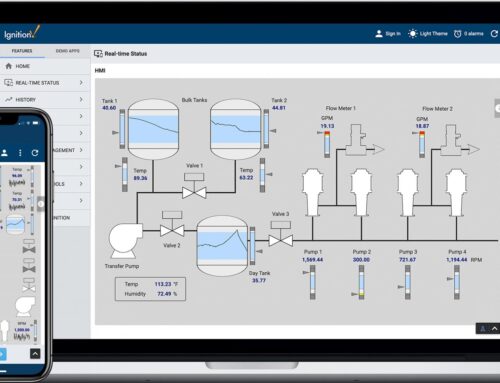
In the ever-evolving landscape of industrial automation, Supervisory Control and Data Acquisition (SCADA) systems have emerged as indispensable tools for monitoring and controlling complex processes. Among the myriad of SCADA solutions available, Ignition SCADA stands out for its flexibility, scalability, and robust feature set. But like any powerful tool, its true potential can only be harnessed through adept usage and informed strategies. Whether you’re a seasoned automation engineer or a newcomer to the world of industrial control systems, understanding the best practices for using Ignition SCADA can significantly enhance your operational efficiency and data accuracy. This article delves into the expert-recommended practices that will help you optimize your use of Ignition SCADA, ensuring that your systems run smoothly, securely, and effectively. Ready to unlock the full potential of your SCADA environment? Let’s dive in.
Optimizing System Performance for Seamless Operations
To ensure your Ignition SCADA system operates at peak efficiency, it’s crucial to adopt best practices that enhance performance and reliability. Begin by optimizing tag structures; organizing tags logically and minimizing unnecessary tag groups can significantly reduce system latency. Additionally, leveraging efficient scripting techniques can help streamline complex operations. Opt for asynchronous scripting where possible and avoid excessive polling, which can bog down the system. Furthermore, utilizing database partitioning and indexing strategies will improve data retrieval speeds, ensuring that historical data is accessible without delay.
Another critical aspect is resource management. Regularly monitor CPU and memory usage to identify potential bottlenecks. Employ load balancing techniques to distribute tasks evenly across servers, which helps in maintaining a stable and responsive system. Also, consider implementing redundancy protocols to safeguard against unexpected downtimes. By enabling automatic failover mechanisms, you can ensure that your operations remain seamless even under adverse conditions. Lastly, always keep your software updated; newer versions often come with performance improvements and critical security patches that are essential for the smooth functioning of your SCADA system.
Enhancing Data Security and Integrity in Ignition SCADA
In the realm of Supervisory Control and Data Acquisition (SCADA) systems, safeguarding data security and ensuring data integrity are paramount. Utilizing Ignition SCADA, a robust and versatile platform, opens up a suite of best practices that can be implemented for optimal security. Begin by employing strong, multi-layered authentication mechanisms. This includes using complex passwords, two-factor authentication, and role-based access control to ensure that only authorized personnel can access critical data and functionalities. Additionally, encrypting data both in transit and at rest can guard against unauthorized access and tampering.
Another critical practice is to regularly update and patch the SCADA software. Keeping the Ignition platform up-to-date with the latest security patches helps mitigate vulnerabilities that could be exploited by malicious actors. Furthermore, implementing intrusion detection systems and monitoring tools can provide real-time alerts for any suspicious activities. Regular audits and comprehensive logging of all user activities can also help in tracing and rectifying any security breaches. By following these best practices, organizations can significantly enhance the security and integrity of their SCADA systems.
Streamlining User Interface for Maximum Usability
When it comes to maximizing usability in Ignition SCADA, the design of the user interface (UI) plays a pivotal role. A well-organized UI can significantly enhance the user experience, making it easier for operators to monitor and control processes efficiently. Start by prioritizing simplicity: avoid cluttered screens and focus on displaying only the most critical information. Use consistent color schemes and intuitive icons to help users quickly identify key elements. Additionally, grouping related controls and indicators can reduce cognitive load and improve navigation.
Another essential practice is to implement responsive design principles. Ensuring that your SCADA system’s interface adapts seamlessly to various screen sizes and resolutions can make a substantial difference, especially in environments where operators may use multiple devices. Incorporate real-time feedback mechanisms like alerts and notifications to keep users informed of system status changes. user testing is invaluable; gather feedback from actual operators to refine the interface. This iterative approach can lead to a more user-friendly and efficient SCADA system.
Implementing Effective Troubleshooting and Maintenance Strategies
Effective troubleshooting and maintenance strategies for Ignition SCADA start with a proactive approach. Regularly scheduled maintenance can prevent many common issues before they escalate. It’s essential to establish a comprehensive maintenance schedule that includes:
-
- Routine system checks to ensure all components are functioning optimally.
-
- Software updates and patches to keep the system secure and efficient.
-
- Backup procedures to safeguard data and configurations.
-
- Hardware inspections to identify and replace aging or failing components.
In addition to regular maintenance, implementing a robust troubleshooting framework is crucial. This should include:
-
- Detailed documentation of system configurations, including network layouts and device settings.
-
- Training programs for staff to ensure they are familiar with the system and can identify issues quickly.
-
- Diagnostic tools integrated into the SCADA system to provide real-time alerts and analysis.
-
- Incident response plans that outline steps to take when an issue is detected, minimizing downtime and impact.
Q&A
Q: What are the best practices for using Ignition SCADA?
A: Ah, the quest for mastering Ignition SCADA, a journey filled with potential and precision. Let’s embark on this path together! Here are some best practices to ensure you harness the full power of Ignition SCADA:
1. Understand Your Requirements First:**
-
- Before diving into the software, take a step back. What are your specific needs? Are you looking for real-time monitoring, historical data analysis, or advanced control? Knowing your goals will guide your configuration and use of Ignition SCADA.
2. Design for Scalability:**
-
- Think big, even if you’re starting small. Design your system with future growth in mind. Ignition SCADA’s modular architecture is perfect for scaling, so plan your tags, templates, and projects with expansion in mind.
3. Leverage Templates and UDTs:**
-
- Utilize User Defined Types (UDTs) and templates to standardize your components. This will save time and ensure consistency across your projects. It’s like building with LEGO blocks – versatile and reusable.
4. Optimize Tag Management:**
-
- Efficient tag management is crucial. Organize tags in a logical hierarchy, use descriptive names, and take advantage of tag groups for bulk operations. This keeps your system clean and manageable.
5. Prioritize Security:**
-
- Security is paramount. Implement role-based access control (RBAC), use secure communication protocols, and ensure regular updates and patches. Protect your data and operations from unauthorized access and cyber threats.
6. Embrace Scripting Wisely:**
-
- Ignition SCADA’s scripting capabilities are powerful, but with great power comes great responsibility. Use scripting to enhance functionality, but keep scripts well-documented and maintainable. Avoid overcomplicating things.
7. Utilize Historical Data Smartly:**
-
- Efficiently manage and analyze historical data. Use the built-in historian for data logging and retrieval, and design dashboards that provide actionable insights. Remember, data is only as valuable as the insights you can derive from it.
8. Test Thoroughly:**
-
- Before deploying changes to the production environment, test rigorously in a development or staging environment. This helps catch issues early and ensures smooth operation.
9. Keep Learning and Updating:**
-
- The world of SCADA is ever-evolving. Stay updated with the latest features, best practices, and community insights. Participate in forums, attend webinars, and keep an eye on new releases and updates.
10. Documentation is Key:**
-
- Document everything – from system architecture and configuration details to standard operating procedures. Good documentation aids in troubleshooting, training new team members, and maintaining consistency.
11. Engage the Community:**
-
- The Ignition SCADA community is robust and supportive. Engage in forums, share your experiences, and learn from others. Sometimes, the best solutions come from collaborative problem-solving.
And there we have it – a roadmap to navigating the intricate landscape of Ignition SCADA. May your journey be efficient, your data insightful, and your systems secure. Happy SCADA-ing!
In Retrospect
As we wrap up our exploration of the best practices for using Ignition SCADA, it’s clear that the journey to optimizing your industrial operations is both intricate and rewarding. By implementing these strategies, you can unlock new levels of efficiency, reliability, and insight within your systems.
But remember, every industrial environment has its unique challenges and opportunities. Whether you’re just starting with Ignition SCADA or looking to refine your existing setup, having a dedicated partner can make all the difference.
At Innorobix Automation, we’re passionate about helping you navigate these complexities with confidence and precision. Our team of experts is ready to collaborate with you, offering tailored solutions and support to elevate your SCADA experience.
Feel inspired to take the next step? Reach out to us today, and let’s transform your industrial landscape together.